Monday, October 20, 2014

How to enable debugger

I am trying to set debugger showing a warning
"X++ debugging is not enabled for code running on Application Object Server"

Solution: open Ax Server Configuration>In Application Object Server tab set to true enable breakpoints to debugg X++ code running on this server


Application Object RunOn property


Object
RunOn Property
Class
Client, server, Called from (Specify the tier by setting the class RunOn property.)
Class instance method
Client, server, Called from
Class static method
Client, server, Called from
Form
Client
Report
Called from
Table
Called from
Table instance method
Called from
Table kernel method(insert, update…)unless overridden
Called from (You can override the table Called from RunOn property value by using server or client modifiers in the method declaration.)
Job
Client

Objects set to Called from can run from either the client or server, depending on where the object is called from

http://msdn.microsoft.com/EN-US/library/aa634829.aspx
 

New Modules in ax 2012 R2


AX 2009 Modules
AX 2012R2 Modules
General Ledger
General Ledger
Fixed Assets (New)
Bank
Cash and bank management
Accounts Payable
Accounts Payable
Procurement and sourcing (New)
Accounts Receivables
Sales and Marketing (New)
Inventory Management
Product information (New)
Inventory and warehouse management
Expense management
Travel and expense management
Production
Production control
Project
Project management and accounting
Compliance and internal control (New)
Payroll(New)
Retail(New)


Monday, October 6, 2014

Error 1740: The endpoint is a duplicate

I have installed second AOS.when i am trying to start second AOS the following error
              

Solution: Two AOS using the same port. change the port for one AOS it will work fine.


How to change AOS ports:

http://technet.microsoft.com/EN-US/library/aa569616.aspx

Tuesday, September 23, 2014

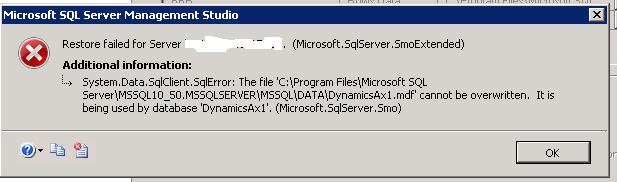
DB Restore Error: Restore failed for server 'ServerName'. (Microsoft.SqlServer.SmoExtended):

I created a testing environment(test1_MSAX) for one of my Live-Organisation through Import Organization in the deployment Manager. For some further RnD purpose, I wanted to create yet another test organization (test2_MSAX) for the same Live-Organization on the Same server where I already had previous test1_MSAX.
Error:
 
Solution:
  • Click on Options.
  • At right side, Under ‘Restore the database file as:‘ section. The first column represent the original file names of file type .mdf and .ldf and right most column represents the file name which you want to provide and restore the DB file as.


  • Click on the browse button and scroll all the way to see the file name and change it to your preferred name(test2_MSAX.mdf and test2_MSAX.ldf).
     
    After changing the restore database file name as, my DB restore succeeded.


    Friday, September 19, 2014

    Downgrading a SQL Server 2012 database to SQL Server 2008 R2

    Different Databases for Ax 2012 in Sql Server


    Databases include the Microsoft Dynamics AX DataBaseModel, and the Baseline database.

    1. The AOS connects to the Microsoft Dynamics AX database to process transactions.
    2. The AOS connects to the model store to display application elements such as forms and reports.
    3. The baseline database contains a model store that is used to upgrade X++ code to Microsoft Dynamics AX 2012. The baseline database is used to analyze application updates before they are applied.
    Other Microsoft Dynamics AX components, such as Enterprise Portal and Reporting Services extensions, also include databases. The additional databases are created when you install those components and their prerequisites.

    update_recordset with joins

     update_recordset with joins update_recordSet storeTransfer         setting      TransactionId = transfertable.TransferId     join transfert...