Wednesday, February 6, 2013

DataTypes in Axapta

primitive datatypes:

Anytype: A placeholder for any data type.    
Booleans: Can only contain the values false and true.
Dates : Contains day, month, and year.
Enums: An abbreviation for enumerated text—a set of literals.
GUIDs : A globally unique identifier.
Integers : A number without a decimal point. To declare an integer, use the keyword int.
Reals : Numbers with a decimal point, also called decimals.
Strings: A number of characters. To declare a string, use the keyword str.
TimeOfDay: Contains hours, minutes, and seconds. To declare a time, use the system type timeOfDay.
utcdatetime: Contains year, month, day, hour, minute and second

composite Datatypes:

Arrays An array is a list of items with the same data type and the same name—only the index differs.
Containers A container is a dynamic list of items containing primitive data types and/or some composite data types.
Classes as Data Types A class is a type definition that describes both variables and methods for instances (objects) of the class.
Delegates as data types A delegate collects methods that subscribe to the delegate. The delegate specifies the parameter signature that all its subscriber methods must share. When the delegate is called, the delegate calls each of its subscribers.
Tables as Data Types All tables defined in the database can be handled as class defination
 

For more information:  http://msdn.microsoft.com/en-us/library/aa853792.aspx
 

Tuesday, February 5, 2013

Delete Actions

The DeleteAction element helps maintain database consistency when a record is deleted.
Define delete actions to specify what should occur when data being deleted in the current table is related to data in another table.

Best Practices:
Have a delete action on every relation between two tables.
Use table delete actions instead of writing code to specify whether deletes are restricted or cascaded.

Types of Delete Actions:

1. None: Delete action disabled.

2. cascade: Deletes related records.
Ex: On the CustTable table, a cascading delete action has been defined for the CustBankAccount table. When a customer is deleted from the CustTable table, the delete method also ensures that the corresponding bank account information is automatically deleted.

3. restricted: Restricts deletion in the current table if data is present in related tables.
Ex: On the CustTable table, a restricted delete action has been defined for the CustTrans table. When a customer is deleted in the CustTable table, the validateDelete method ascertains whether transactions exist for the customer in the CustTrans table. If so, validateDelete returns false.


4. cascade+restricted: Cascade the delete, even though records exist on related tables.


Ex: we have three tables  Person ,Customer & Order
Now Person is a parent of Customer table, and Customer is a parent of Order table having (One-To-Many) relations.
If I set a Delete action property on Person table to “CASCADE” for customer table  and If I set a  Delete Action property on a CUSTOMER table for Order table to “CASCADE +RESTRICTED”.
So if I delete a record from Customer table then It will first check the record in the child table(order table) and if exist that warning prompt saying that first we need to delete a record from child table.
But if I delete a record from Person table it will automatically delete a record in Customer table and all records related to customer table in Order table would also be deleted.
The Cascade+Restricted delete action is used in the standard application for LedgerJournalTrans on LedgerJournalTable.

This type of delete action is useful when you prefer a total clean-up—when you delete a customer, you also delete all the transactions associated with that customer.


How to Create a Delete Actions:

http://msdn.microsoft.com/EN-US/library/bb315018.aspx

Relations

The foundation of Microsoft Dynamics AX is the relational database.
In AX, the relationship between tables is called a relation, that contain related data.

Relations in Microsoft Dynamics AX:
  1. Keep the database consistent (enforce referential integrity).
  2. Enable the look up of values in other tables .
  3. Are used to validate data.
  4. Are used by the Auto Join system in forms.
  5. Automatically propagate changes from one table to another.
  6. Auto-define table relationships in queries.
Uses: Table relations are most commonly used in form fields to enable the look up of information in another table.
If a table relation exists, the lookup button can be used to display a lookup list of values for a particular field.

Different Types:

Normal to specify relation fields without conditions.

Ex: 

Field fixed to specify relation fields to restrict the records in the primary table.
Format: Table.Field == <EnumValue>
Restricts the records selected in the primary table. Only records that meet the condition are selected.The condition is ANDed with your relation.
Ex:
 
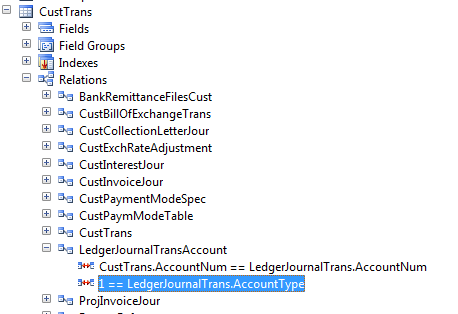
Related field fixed to specify relation fields that restrict the records in the related table.
Format: <EnumValue>==Table.Field
Restricts the records selected in the related table. Only records that meet the condition are selected.The condition is ANDed with your relation.

Ex


Newly Added in Axapta-2012:
ForeignKey to specify a correspondence between a foreign key field in the present table to the primary key field in another parent table.
For more information: http://msdn.microsoft.com/en-us/library/aa556809.aspx


What are the default Field Groups in axapta and Use

FieldGroup:
Field groups are objects that group together fields that logically belong together.
Field groups can exist on tables, maps, or views.
You should define a field group when several fields participate in a single function or are related in some way and are shown together on forms and reports.
In Microsoft Dynamics AX, field groups are found in the AOT--> Data Dictionary -->Field Groups.
A field can belong to more than one field group within the same table, map, or view.

Default Field Groups:
When a table, map, or view is created, two field groups are automatically created:
  1. AutoReport - this field group is used to create the system's automatic reports. The fields placed in this group are displayed when a user clicks Print in the File menu from a form. The AutoReport field group is empty until you add fields to it.
  2. AutoLookup - this field group is used in lookup forms. The fields in the field group display when the user clicks the lookup button from a form control.The AutoLookup group is empty until you add fields to it.
important:
If a table has a display or edit method the method can also be added to a field group. 

Wednesday, January 16, 2013

X++ keywords and functions in Axapta-2012

X++ keywords and functions in Axapta-2012

http://msdn.microsoft.com/en-us/library/aa661012.aspx  for keywords
http://msdn.microsoft.com/en-us/library/aa856741.aspx  for functions


some useful links and blogs for Axapta

Hi guys first of all Happy New Year to all.....

Here i am posting some important links and blogs for axapta.

Installation for Microsoft Dynamics Axapta-2012
http://technet.microsoft.com/en-us/library/dd362138.aspx
Installation for Enterprise portal
http://technet.microsoft.com/en-us/library/gg731916.aspx
Microsoft Dynamics Axapta 4.0, 2009, 2012 for developers
http://msdn.microsoft.com/en-us/library/hh881894.aspx
white papers for developers
Microsoft dynamics ax 2012 for developers
X++ programming guide
Reporting in ax – 2012
Implementing Workflow for Ax-2012
Services and AIF in Ax-2012
Enterprise Portal in Ax-2012
upgrading to new version
http://msdn.microsoft.com/EN-US/library/aa588216.aspx
http://technet.microsoft.com/en-us/library/dd362002.aspx
for application user's
http://technet.microsoft.com/EN-US/library/hh242087.aspx
Shortcut keys Ax-2012
http://technet.microsoft.com/en-us/library/aa571220.aspx
How to install a Microsoft Dynamics Ax hotfix
http://support.microsoft.com/kb/893082
Ax Design patterns-2012
http://msdn.microsoft.com/en-us/library/aa851876.aspx
AX IDE concepts
http://msdn.microsoft.com/en-us/library/aa676506.aspx
for sql server -2012
http://msdn.microsoft.com/en-us/library/ms187875.aspx
for system administrator
http://technet.microsoft.com/en-us/library/gg731797.aspx
Enterprise Development Cook Book-2012
http://www.microsoft.com/en-us/download/details.aspx?id=30171
Find AX Content
http://technet.microsoft.com/EN-US/library/hh881831.aspx
Data Export/Import and migration framework
http://technet.microsoft.com/en-us/library/aa834437.aspx
Retail for developers
http://msdn.microsoft.com/EN-US/library/jj710398.aspx
Security
http://msdn.microsoft.com/EN-US/library/aa653742.aspx


some useful video's:
http://www.youtube.com/watch?v=c4ujmcbP954  for install Axapta
http://www.youtube.com/watch?v=wDQL_UXe648  for E.P


and Blogs also
http://dynamicsuser.net/


update_recordset with joins

 update_recordset with joins update_recordSet storeTransfer         setting      TransactionId = transfertable.TransferId     join transfert...