Tuesday, February 5, 2013

Relations

The foundation of Microsoft Dynamics AX is the relational database.
In AX, the relationship between tables is called a relation, that contain related data.

Relations in Microsoft Dynamics AX:
  1. Keep the database consistent (enforce referential integrity).
  2. Enable the look up of values in other tables .
  3. Are used to validate data.
  4. Are used by the Auto Join system in forms.
  5. Automatically propagate changes from one table to another.
  6. Auto-define table relationships in queries.
Uses: Table relations are most commonly used in form fields to enable the look up of information in another table.
If a table relation exists, the lookup button can be used to display a lookup list of values for a particular field.

Different Types:

Normal to specify relation fields without conditions.

Ex: 

Field fixed to specify relation fields to restrict the records in the primary table.
Format: Table.Field == <EnumValue>
Restricts the records selected in the primary table. Only records that meet the condition are selected.The condition is ANDed with your relation.
Ex:
 
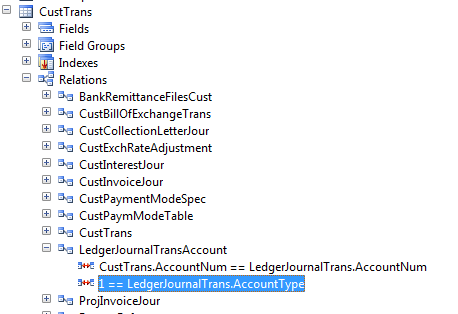
Related field fixed to specify relation fields that restrict the records in the related table.
Format: <EnumValue>==Table.Field
Restricts the records selected in the related table. Only records that meet the condition are selected.The condition is ANDed with your relation.

Ex

Newly Added in Axapta-2012:
ForeignKey to specify a correspondence between a foreign key field in the present table to the primary key field in another parent table.
For more information: http://msdn.microsoft.com/en-us/library/aa556809.aspx


What are the default Field Groups in axapta and Use

FieldGroup:
Field groups are objects that group together fields that logically belong together.
Field groups can exist on tables, maps, or views.
You should define a field group when several fields participate in a single function or are related in some way and are shown together on forms and reports.
In Microsoft Dynamics AX, field groups are found in the AOT--> Data Dictionary -->Field Groups.
A field can belong to more than one field group within the same table, map, or view.

Default Field Groups:
When a table, map, or view is created, two field groups are automatically created:
  1. AutoReport - this field group is used to create the system's automatic reports. The fields placed in this group are displayed when a user clicks Print in the File menu from a form. The AutoReport field group is empty until you add fields to it.
  2. AutoLookup - this field group is used in lookup forms. The fields in the field group display when the user clicks the lookup button from a form control.The AutoLookup group is empty until you add fields to it.
important:
If a table has a display or edit method the method can also be added to a field group. 

Wednesday, January 16, 2013

X++ keywords and functions in Axapta-2012

X++ keywords and functions in Axapta-2012

http://msdn.microsoft.com/en-us/library/aa661012.aspx  for keywords
http://msdn.microsoft.com/en-us/library/aa856741.aspx  for functions


some useful links and blogs for Axapta

Hi guys first of all Happy New Year to all.....

Here i am posting some important links and blogs for axapta.

Installation for Microsoft Dynamics Axapta-2012
http://technet.microsoft.com/en-us/library/dd362138.aspx
Installation for Enterprise portal
http://technet.microsoft.com/en-us/library/gg731916.aspx
Microsoft Dynamics Axapta 4.0, 2009, 2012 for developers
http://msdn.microsoft.com/en-us/library/hh881894.aspx
white papers for developers
Microsoft dynamics ax 2012 for developers
X++ programming guide
Reporting in ax – 2012
Implementing Workflow for Ax-2012
Services and AIF in Ax-2012
Enterprise Portal in Ax-2012
upgrading to new version
http://msdn.microsoft.com/EN-US/library/aa588216.aspx
http://technet.microsoft.com/en-us/library/dd362002.aspx
for application user's
http://technet.microsoft.com/EN-US/library/hh242087.aspx
Shortcut keys Ax-2012
http://technet.microsoft.com/en-us/library/aa571220.aspx
How to install a Microsoft Dynamics Ax hotfix
http://support.microsoft.com/kb/893082
Ax Design patterns-2012
http://msdn.microsoft.com/en-us/library/aa851876.aspx
AX IDE concepts
http://msdn.microsoft.com/en-us/library/aa676506.aspx
for sql server -2012
http://msdn.microsoft.com/en-us/library/ms187875.aspx
for system administrator
http://technet.microsoft.com/en-us/library/gg731797.aspx
Enterprise Development Cook Book-2012
http://www.microsoft.com/en-us/download/details.aspx?id=30171
Find AX Content
http://technet.microsoft.com/EN-US/library/hh881831.aspx
Data Export/Import and migration framework
http://technet.microsoft.com/en-us/library/aa834437.aspx
Retail for developers
http://msdn.microsoft.com/EN-US/library/jj710398.aspx
Security
http://msdn.microsoft.com/EN-US/library/aa653742.aspx


some useful video's:
http://www.youtube.com/watch?v=c4ujmcbP954  for install Axapta
http://www.youtube.com/watch?v=wDQL_UXe648  for E.P


and Blogs also
http://dynamicsuser.net/


Thursday, November 8, 2012

About Layers and Difference between Layers

Layer: a layer system is used to manage elements.
The USR layer is the top layer and the SYS layer is the bottom layer, and each layer has a corresponding patch layer above it.

USR: The user layer is for user modifications, such as reports.
CUS:The customer layer is for modifications that are specific to a company.
VAR:Value Added Resellers (VAR) can make modifications or new developments to the VAR layer as specified by the customers or as a strategy of creating an industry specific solution.
ISV:When an Independent Software Vendor (ISV) creates their own solution, their modifications are saved in the ISV layer.
SLN:The solution layer is used by distributors to implement vertical partner solutions.
FPK:The FPK layer is an application object patch layer reserved by Microsoft for future patching or other updates.
GLS:When the application is modified to match country or region specific legal demands, these modifications are saved in the GLS layer.
SYS:The standard application is implemented at the lowest level, the SYS layer. The application objects in the standard application can never be deleted.

Patch Layers:Each layer in Microsoft Dynamics AX has a corresponding patch layer that can be used to incorporate updates to your application or to store conflicts when you import models into a layer.


Microsoft only:
  • SYS/SYP: System Layer
  • GLS/GLP: Globalization Layer
  • FPK/FPP: Future Pack Layer
Partners and ISV:
  • SLN/SLP: Solution Layer
  • ISV/ISP: Independent Software vendor Layer
  • VAR/VAP: Value Added reseller
Partners and customers:
  • CUS/CUP: Customer Layer
  • USR/USP: User Layer 
Differences between Layers in Axapta 4.0, 5.0 and 6.0 :


Error and Warning Messages

update_recordset with joins

 update_recordset with joins update_recordSet storeTransfer         setting      TransactionId = transfertable.TransferId     join transfert...